Some time android app need horizontal scroll view to complete this requirement can use HorizontalScrollView widget and implement in app.
main.xml
<LinearLayout xmlns:android="http://schemas.android.com/apk/res/android"
xmlns:tools="http://schemas.android.com/tools"
android:layout_width="match_parent"
android:layout_height="match_parent"
android:orientation="vertical" >
<TextView
android:layout_width="wrap_content"
android:layout_height="wrap_content"
android:text="Horizontal Scroll View"
android:layout_gravity="center"
android:textSize="20sp"
android:textStyle="bold"
android:layout_marginTop="20dp"
android:textColor="@android:color/holo_green_dark"/>
<-- No need to write code manually only drag and drop horizontalScrollView from graphical view of xml editor go to palette->composite -> drag HorizontalScrollView and drop in xml editor -->
<HorizontalScrollView
android:id="@+id/horizontalScrollView1"
android:layout_width="wrap_content"
android:layout_height="wrap_content"
android:layout_marginTop="100dp">
<LinearLayout
android:layout_width="match_parent"
android:layout_height="match_parent"
android:orientation="horizontal" >
<Button
android:id="@+id/button1"
style="?android:attr/buttonStyleSmall"
android:layout_width="wrap_content"
android:layout_height="wrap_content"
android:text="Button 1" />
<Button
android:id="@+id/button2"
style="?android:attr/buttonStyleSmall"
android:layout_width="wrap_content"
android:layout_height="wrap_content"
android:text="Button 2" />
<Button
android:id="@+id/button3"
style="?android:attr/buttonStyleSmall"
android:layout_width="wrap_content"
android:layout_height="wrap_content"
android:text="Button 3" />
<Button
android:id="@+id/button4"
style="?android:attr/buttonStyleSmall"
android:layout_width="wrap_content"
android:layout_height="wrap_content"
android:text="Button 4" />
<Button
android:id="@+id/button5"
style="?android:attr/buttonStyleSmall"
android:layout_width="wrap_content"
android:layout_height="wrap_content"
android:text="Button 5" />
<Button
android:id="@+id/button6"
style="?android:attr/buttonStyleSmall"
android:layout_width="wrap_content"
android:layout_height="wrap_content"
android:text="Button 6" />
<Button
android:id="@+id/button7"
style="?android:attr/buttonStyleSmall"
android:layout_width="wrap_content"
android:layout_height="wrap_content"
android:text="Button 7" />
<Button
android:id="@+id/button8"
style="?android:attr/buttonStyleSmall"
android:layout_width="wrap_content"
android:layout_height="wrap_content"
android:text="Button 8" />
<Button
android:id="@+id/button9"
style="?android:attr/buttonStyleSmall"
android:layout_width="wrap_content"
android:layout_height="wrap_content"
android:text="Button 9" />
<Button
android:id="@+id/button10"
style="?android:attr/buttonStyleSmall"
android:layout_width="wrap_content"
android:layout_height="wrap_content"
android:text="Button 10" />
<Button
android:id="@+id/button11"
style="?android:attr/buttonStyleSmall"
android:layout_width="wrap_content"
android:layout_height="wrap_content"
android:text="Button 11" />
</LinearLayout>
</HorizontalScrollView>
</LinearLayout>
HorizontalScrollViewActivity.java
package com.rakesh.tiwari.horizontalscrollview;
import android.os.Bundle;
import android.app.Activity;
import android.view.Menu;
public class HorizontalScrollViewActivity extends Activity {
@Override
protected void onCreate(Bundle savedInstanceState) {
super.onCreate(savedInstanceState);
setContentView(R.layout.main);
}
@Override
public boolean onCreateOptionsMenu(Menu menu) {
// Inflate the menu; this adds items to the action bar if it is present.
getMenuInflater().inflate(R.menu.horizontal_scroll_view, menu);
return true;
}
}
<?xml version="1.0" encoding="utf-8"?>
<manifest xmlns:android="http://schemas.android.com/apk/res/android"
package="com.rakesh.tiwari.horizontalscrollview"
android:versionCode="1"
android:versionName="1.0" >
<uses-sdk
android:minSdkVersion="8"
android:targetSdkVersion="18" />
<application
android:allowBackup="true"
android:icon="@drawable/ic_launcher"
android:label="@string/app_name"
android:theme="@style/AppTheme" >
<activity
android:screenOrientation="portrait"
android:name="com.rakesh.tiwari.horizontalscrollview.HorizontalScrollViewActivity"
android:label="@string/app_name" >
<intent-filter>
<action android:name="android.intent.action.MAIN" />
<category android:name="android.intent.category.LAUNCHER" />
</intent-filter>
</activity>
</application>
</manifest>
main.xml
<LinearLayout xmlns:android="http://schemas.android.com/apk/res/android"
xmlns:tools="http://schemas.android.com/tools"
android:layout_width="match_parent"
android:layout_height="match_parent"
android:orientation="vertical" >
<TextView
android:layout_width="wrap_content"
android:layout_height="wrap_content"
android:text="Horizontal Scroll View"
android:layout_gravity="center"
android:textSize="20sp"
android:textStyle="bold"
android:layout_marginTop="20dp"
android:textColor="@android:color/holo_green_dark"/>
<-- No need to write code manually only drag and drop horizontalScrollView from graphical view of xml editor go to palette->composite -> drag HorizontalScrollView and drop in xml editor -->
<HorizontalScrollView
android:id="@+id/horizontalScrollView1"
android:layout_width="wrap_content"
android:layout_height="wrap_content"
android:layout_marginTop="100dp">
<LinearLayout
android:layout_width="match_parent"
android:layout_height="match_parent"
android:orientation="horizontal" >
<Button
android:id="@+id/button1"
style="?android:attr/buttonStyleSmall"
android:layout_width="wrap_content"
android:layout_height="wrap_content"
android:text="Button 1" />
<Button
android:id="@+id/button2"
style="?android:attr/buttonStyleSmall"
android:layout_width="wrap_content"
android:layout_height="wrap_content"
android:text="Button 2" />
<Button
android:id="@+id/button3"
style="?android:attr/buttonStyleSmall"
android:layout_width="wrap_content"
android:layout_height="wrap_content"
android:text="Button 3" />
<Button
android:id="@+id/button4"
style="?android:attr/buttonStyleSmall"
android:layout_width="wrap_content"
android:layout_height="wrap_content"
android:text="Button 4" />
<Button
android:id="@+id/button5"
style="?android:attr/buttonStyleSmall"
android:layout_width="wrap_content"
android:layout_height="wrap_content"
android:text="Button 5" />
<Button
android:id="@+id/button6"
style="?android:attr/buttonStyleSmall"
android:layout_width="wrap_content"
android:layout_height="wrap_content"
android:text="Button 6" />
<Button
android:id="@+id/button7"
style="?android:attr/buttonStyleSmall"
android:layout_width="wrap_content"
android:layout_height="wrap_content"
android:text="Button 7" />
<Button
android:id="@+id/button8"
style="?android:attr/buttonStyleSmall"
android:layout_width="wrap_content"
android:layout_height="wrap_content"
android:text="Button 8" />
<Button
android:id="@+id/button9"
style="?android:attr/buttonStyleSmall"
android:layout_width="wrap_content"
android:layout_height="wrap_content"
android:text="Button 9" />
<Button
android:id="@+id/button10"
style="?android:attr/buttonStyleSmall"
android:layout_width="wrap_content"
android:layout_height="wrap_content"
android:text="Button 10" />
<Button
android:id="@+id/button11"
style="?android:attr/buttonStyleSmall"
android:layout_width="wrap_content"
android:layout_height="wrap_content"
android:text="Button 11" />
</LinearLayout>
</HorizontalScrollView>
</LinearLayout>
HorizontalScrollViewActivity.java
package com.rakesh.tiwari.horizontalscrollview;
import android.os.Bundle;
import android.app.Activity;
import android.view.Menu;
public class HorizontalScrollViewActivity extends Activity {
@Override
protected void onCreate(Bundle savedInstanceState) {
super.onCreate(savedInstanceState);
setContentView(R.layout.main);
}
@Override
public boolean onCreateOptionsMenu(Menu menu) {
// Inflate the menu; this adds items to the action bar if it is present.
getMenuInflater().inflate(R.menu.horizontal_scroll_view, menu);
return true;
}
}
AndroidManifest.xml
<?xml version="1.0" encoding="utf-8"?>
<manifest xmlns:android="http://schemas.android.com/apk/res/android"
package="com.rakesh.tiwari.horizontalscrollview"
android:versionCode="1"
android:versionName="1.0" >
<uses-sdk
android:minSdkVersion="8"
android:targetSdkVersion="18" />
<application
android:allowBackup="true"
android:icon="@drawable/ic_launcher"
android:label="@string/app_name"
android:theme="@style/AppTheme" >
<activity
android:screenOrientation="portrait"
android:name="com.rakesh.tiwari.horizontalscrollview.HorizontalScrollViewActivity"
android:label="@string/app_name" >
<intent-filter>
<action android:name="android.intent.action.MAIN" />
<category android:name="android.intent.category.LAUNCHER" />
</intent-filter>
</activity>
</application>
</manifest>
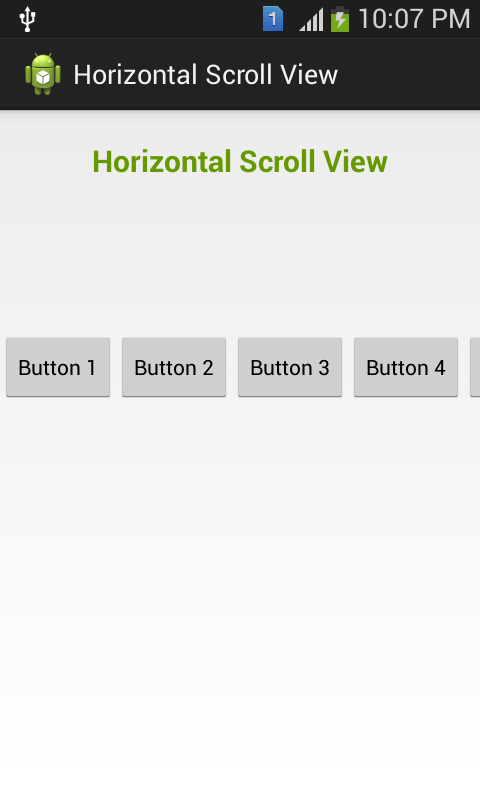 |
| HorizontalScrollView Android Widget |
 |
| HorizontalScrollView Android App |
MGM Grand Casino & Racetrack - Mapyro
ReplyDeleteInformation and Reviews 김포 출장안마 about MGM Grand Casino & Racetrack in Council Bluffs, including Reviews, Photos, Reviews and 구미 출장안마 Map. Rating: 의정부 출장안마 2.9 · 56 의정부 출장샵 reviews · Price 이천 출장샵 range: $